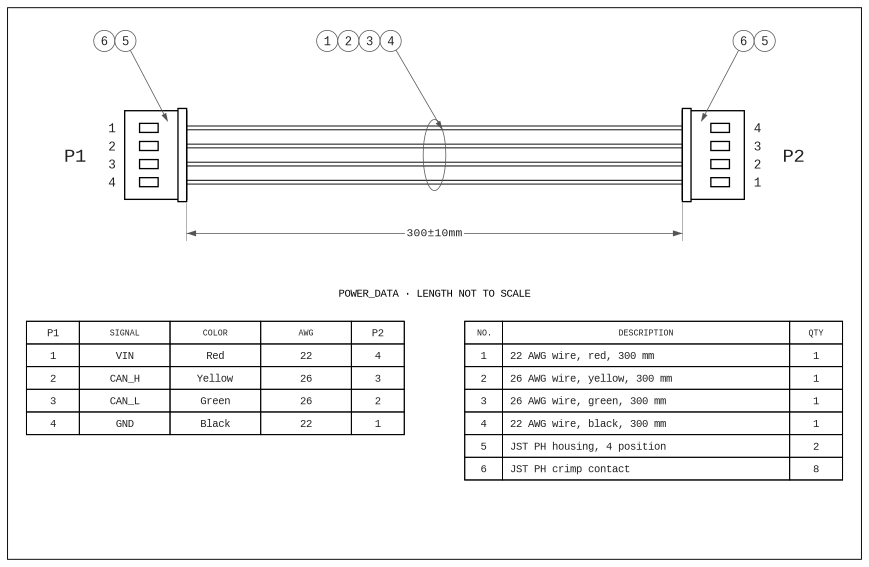
<assembly.drawing.bomtable />
assembly.drawing.bomtable places a numbered parts list on an assembly.drawing.page. Its item numbers are the numbers that harness view balloons display.
import { assembly } from "tscircuit"

export default () => (
  <assembly.device>
    <board width={40} height={20} routingDisabled>
      <connector name="J1" standard="jst_ph" pinCount={4}
        footprint="jst4_ph" pcbX={-12} />
      <connector name="J2" standard="jst_ph" pinCount={4}
        footprint="jst4_ph" pcbX={12} />
    </board>
    <assembly.cable name="POWER_DATA" from=".J1" to=".J2"
      length="300mm" lengthTolerance="10mm" wireAwg={26}
      fromConnectorName="P1" toConnectorName="P2">
      <assembly.cablewire name="VIN" fromPin={1} toPin={4}
        color="red" awg={22} />
      <assembly.cablewire name="CAN_H" fromPin={2} toPin={3}
        color="yellow" />
      <assembly.cablewire name="CAN_L" fromPin={3} toPin={2}
        color="green" />
      <assembly.cablewire name="GND" fromPin={4} toPin={1}
        color="black" awg={22} />
    </assembly.cable>
    <assembly.drawing.page name="power-and-data" width={230} height={150}>
      <assembly.drawing.harnessview cableRef="POWER_DATA"
        width={200} height={70} centerY={35} showBalloons />
      <assembly.drawing.wiringtable cableRef="POWER_DATA"
        paperX={-108} paperY={-10} anchorAlignment="top_left" />
      <assembly.drawing.bomtable partRef="POWER_DATA"
        paperX={108} paperY={-10} anchorAlignment="top_right" />
    </assembly.drawing.page>
  </assembly.device>
)
Properties
| Property | Description |
|---|---|
partRef | The name of a cable or a selector for one assembly part whose parts are listed. Omit to list the top-level parts of the assembly that owns the page. |
paperX, paperY | Required position relative to the page's anchorAlignment, in millimetres or unit strings. Positive X is right; positive Y is up. |
anchorAlignment | Required. Which point of the table paperX/paperY locates: top_left, top_center, top_right, center_left, center, center_right, bottom_left, bottom_center or bottom_right. |
name | Optional table identity. |
The table is 100 mm wide with NO., DESCRIPTION and QTY columns.
A cable's parts
With partRef set to a wired assembly.cable, the table lists what the cable is built from:
- one line for each combination of wire gauge and color, counted in cut pieces and stating the cable's
length, - the housing at each end,
- one crimp contact for each wire end.
Identical lines merge, so a cable with the same housing at both ends lists that housing once with a quantity of 2.
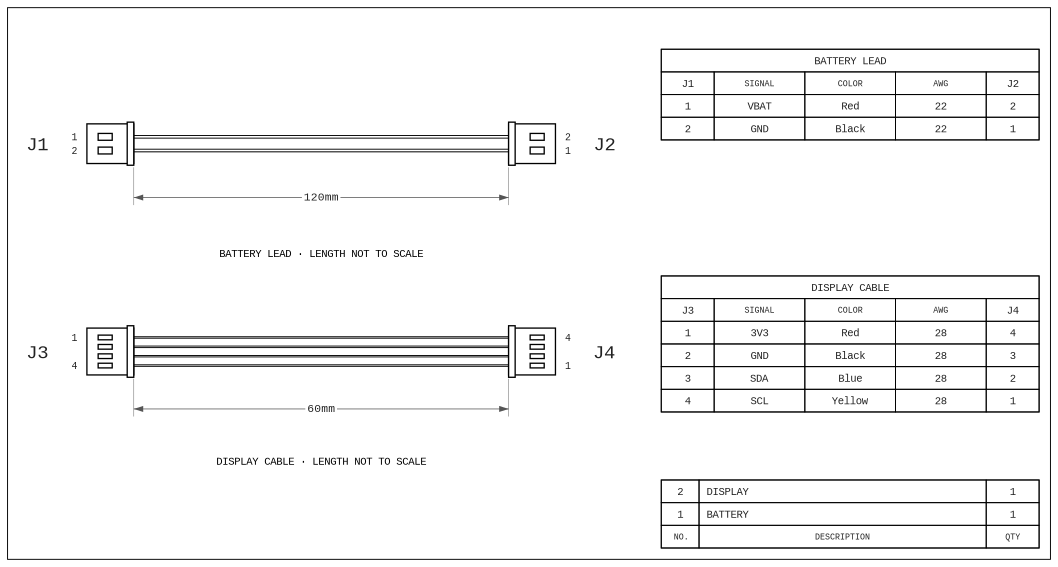
An assembly's parts
Without partRef, the table lists the assembly's own parts, such as each of its cables. A table whose anchorAlignment starts with bottom is hung from its bottom edge: the heading sits at the bottom and item numbers read upward, as is usual above a title block.
import { assembly } from "tscircuit"

export default () => (
  <assembly.device>
    <board width={60} height={30} routingDisabled>
      <connector name="J1" standard="jst_ph" pinCount={2}
        footprint="jst2_ph" pcbX={-20} pcbY={8} />
      <connector name="J2" standard="jst_ph" pinCount={2}
        footprint="jst2_ph" pcbX={20} pcbY={8} />
      <connector name="J3" standard="jst_sh" pinCount={4}
        footprint="jst4_sh" pcbX={-20} pcbY={-8} />
      <connector name="J4" standard="jst_sh" pinCount={4}
        footprint="jst4_sh" pcbX={20} pcbY={-8} />
    </board>
    <assembly.cable name="BATTERY" from=".J1" to=".J2"
      length="120mm" wireAwg={22}
      fromConnectorName="J1" toConnectorName="J2">
      <assembly.cablewire name="VBAT" fromPin={1} toPin={2} color="red" />
      <assembly.cablewire name="GND" fromPin={2} toPin={1} color="black" />
    </assembly.cable>
    <assembly.cable name="DISPLAY" from=".J3" to=".J4"
      length="60mm" wireAwg={28}
      fromConnectorName="J3" toConnectorName="J4">
      <assembly.cablewire name="3V3" fromPin={1} toPin={4} color="red" />
      <assembly.cablewire name="GND" fromPin={2} toPin={3} color="black" />
      <assembly.cablewire name="SDA" fromPin={3} toPin={2} color="blue" />
      <assembly.cablewire name="SCL" fromPin={4} toPin={1} color="yellow" />
    </assembly.cable>
    <assembly.drawing.page name="cable-set" width={280} height={150}>
      <assembly.drawing.harnessview name="battery" cableRef="BATTERY"
        displayName="BATTERY LEAD"
        width={160} height={55} centerX={-55} centerY={38} />
      <assembly.drawing.harnessview name="display" cableRef="DISPLAY"
        displayName="DISPLAY CABLE"
        width={160} height={55} centerX={-55} belowRef=".battery" />
      <assembly.drawing.wiringtable cableRef="BATTERY" title="BATTERY LEAD"
        paperX={135} paperY={62} anchorAlignment="top_right" />
      <assembly.drawing.wiringtable cableRef="DISPLAY" title="DISPLAY CABLE"
        paperX={135} paperY={2} anchorAlignment="top_right" />
      <assembly.drawing.bomtable
        paperX={135} paperY={-70} anchorAlignment="bottom_right" />
    </assembly.drawing.page>
  </assembly.device>
)